Counting on paper, then typing it up
It gets counted in a notebook and someone types it into the spreadsheet later. Double the work and numbers that drift.

Count by zone, with several people at once, and send what's missing to the cart.
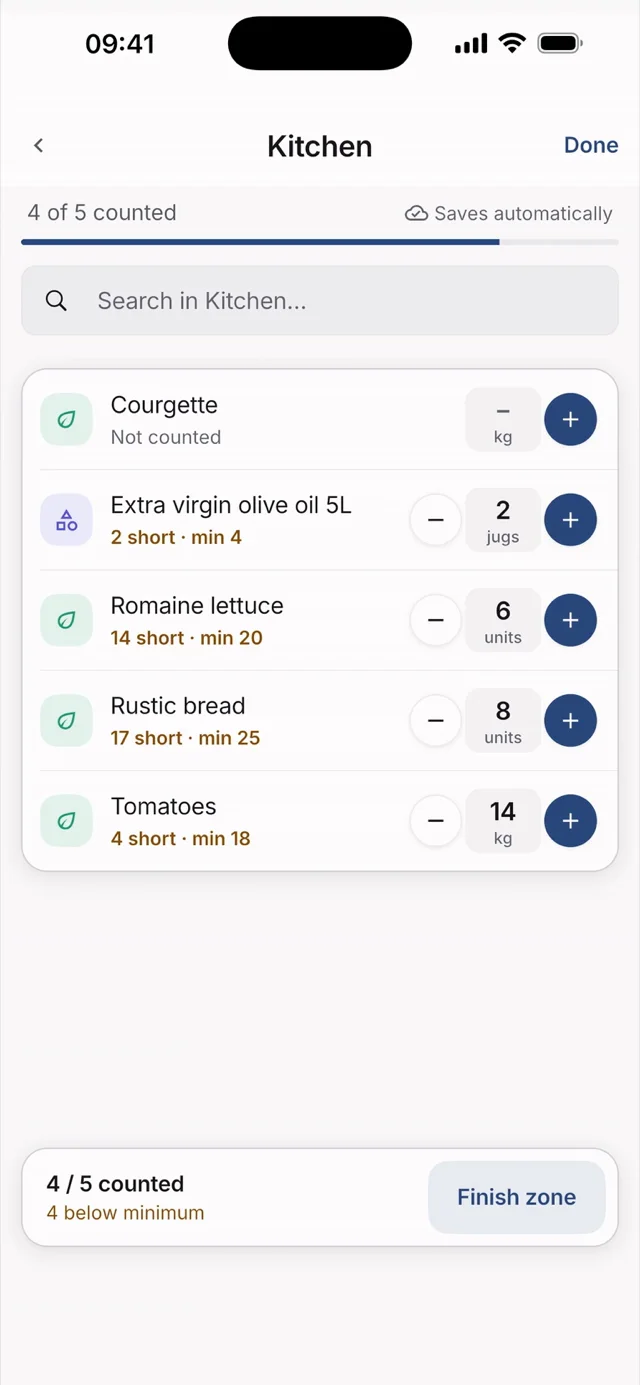
Hostelella's inventory is a stock count for restaurants, bars and hotels. The team counts by zone — bar, kitchen, storeroom — on their phones, several people at once, and every quantity saves itself. When you finish, you see what has run out or is below its minimum and send it to the cart.
The count feeds purchasing. The stock from the last count appears under each product in the cart and on its page, with the date, and whatever is below its minimum is added to the cart grouped by supplier. Zones are the same across Products, Inventory and Purchasing, and you can ask Ella what still needs buying.
It is a count, not real-time stock: it does not go down when you sell or up when you receive. Hostelella is not a POS and does not calculate recipes or dish costings yet. Inventory is included in all three plans, from €9.99 + VAT per venue/month, with a 7-day Ella Pro trial and no card. For hands-on help with cost control, Ella Director is a separate professional service.
Open “Inventory” and tap your zone. If one has been assigned to you, it shows as “Your turn”.
Enter each product's quantity on the keypad; “Out of stock” records zero, and products bought by the case can be counted as cases plus singles. Each product saves itself.
Whoever manages checks the count in “Review”, sends what's missing to the cart and closes the inventory.
It gets counted in a notebook and someone types it into the spreadsheet later. Double the work and numbers that drift.
With a single sheet only one person can count at a time, or two who overwrite what's already been counted.
Without minimums or a recent count, the shortage shows up in the middle of service.
Count quickly and order what's missing, with nothing to type up.
Each person in their zone, at the same time, without overwriting each other.
What's missing doesn't stay on a list: it gets ordered.
You count, zone by zone, how much there is of each product and compare it with the minimum you want to keep. In Hostelella you open “Inventory”, each person counts their zone on their phone, and whoever manages reviews, sends what's missing to the cart and closes the count.
No. Hostelella is not a POS: stock is a snapshot of the last count, shown with its date, and it does not go down when you sell or up when you receive. To keep it current, you count again.
Yes. Each person counts their zone on their own phone, each product is saved as it is counted and nobody overwrites anyone else's work. Whoever manages can assign the zones, and each person gets a notice with a direct link to theirs.
Yes. You create your venue's zones — bar, cold room, storeroom — and set a minimum for each product. Products you buy by the case are counted as cases plus singles and the app works out the total.
Not yet. Today the app does not calculate recipes or dish costings. Managers do see each product's latest purchase price and how it has changed.
Yes. In “Products” → “Upload file” you choose an Excel file, a CSV, a PDF or a photo, review what the app has read and confirm. It is done by an admin or the owner, and that reading uses part of the plan's monthly AI allowance.
Try 7 days on Ella Pro, free and with no card: set up your zones, share out the count and send what's missing to the cart. Then choose a plan, from €9.99 + VAT per venue/month.
No card · One trial sign-up per user and payer

Sign in from your browser or download the app for iPhone and Android.