Orders that leave no trace
A voice note to the rep, a phone call, a note in the kitchen. Nobody else knows what was ordered, from whom or for when.

Fill the cart, send one order to each supplier and check the delivery against the delivery note.
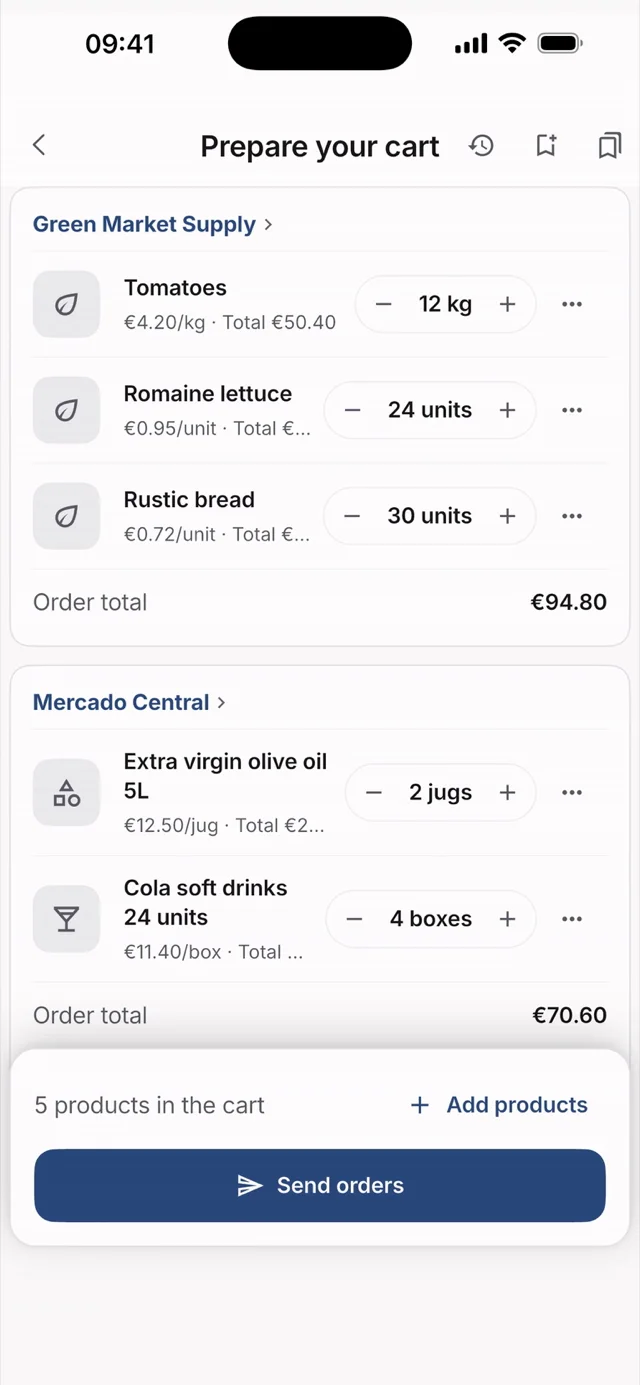
Hostelella's purchasing brings order to supplier orders for your restaurant, bar or hotel. You gather what needs ordering in the cart, the app creates one order per supplier and emails it to them, and when the goods arrive you check the delivery note against what you ordered. It replaces paper notes and scattered messages.
Purchasing feeds on the rest of the app. The cart shows the stock from the last count next to each product and takes in whatever fell below its minimum in one tap. On receiving, the delivery note is saved in Papers and linked to the order, and the prices from your invoices show up on each product's and each supplier's page.
Preparing and sending orders is included in all three plans; what changes between them is the monthly AI allowance, such as document reading. Plans start at €9.99 + VAT per venue/month, with a 7-day Ella Pro trial and no card. If you want someone to negotiate with your suppliers for you, that is Ella Director, a separate professional service.
Tap “Cart”, add products by name or from a supplier's catalogue and adjust the quantities. Under each product you see the stock from the last count.
Tap “Create orders”: the app groups one order per supplier. You set the delivery date and each supplier receives an email with only their lines.
When the goods arrive, tap “Receive” and scan the delivery note. Ella checks it against your order and tells you whether everything arrived or there are differences.
A voice note to the rep, a phone call, a note in the kitchen. Nobody else knows what was ordered, from whom or for when.
The driver is in a hurry and it gets signed unread. What was missing or came at another price turns up, with luck, on the invoice.
Each supplier delivers on certain days and has a cut-off time. Miss it and you're short until the next delivery.
Ordering and receiving, with everything in writing.
The cart becomes orders and each one goes to the right recipient.
You know what arrived, what's missing and what changed price.
Add what you need to the cart, tap “Create orders” and the app generates one order per supplier. You choose the delivery date and each supplier receives it by email with only their lines.
No. They receive an email and, when they open the confirmation link in it, the order is confirmed from their browser. On the same page they can change the delivery date or leave you a note.
Not yet: orders are sent by email, so each supplier needs an ordering email address on their page. If you order by phone one day, you can mark it as done in the calendar and still receive that delivery as “An order placed outside the app”.
When you receive with the delivery note, the app shows what arrived, what's missing and what came at a different price. With “Save and claim what's missing” you email the claim to the supplier, and the order stays partially received while quantities are outstanding.
Yes, as long as no goods have come in. When you edit it, the supplier receives the updated order; when you cancel it, they get an email asking them not to prepare or deliver it. An order that has already been received can't be edited.
Yes, with one condition. Each product's page shows every supplier's latest price and marks “Cheapest” only when they all invoice in the same format, so a 5-litre pack is never compared with a single litre. Prices are visible only to managers, admins and owners.
Try 7 days on Ella Pro, free and with no card: add your suppliers, fill the cart and send your first order. Then choose a plan, from €9.99 + VAT per venue/month.
No card · One trial sign-up per user and payer

Sign in from your browser or download the app for iPhone and Android.